

If you run a business anywhere in Los Angeles, you already know that your network is the backbone of everything you do. Payments, emails, cloud apps, security cameras, POS systems — all of it rides on the same router and firewall setup sitting in a closet somewhere in your office. And yet, most business owners only think about that setup after something goes wrong: the internet keeps dropping, a vendor mentions a security audit, or worse, someone gets a ransomware note on a Monday morning.
After spending years installing and troubleshooting networks for offices across LA — from small retail shops in Koreatown to growing startups downtown — I’ve noticed the same questions come up again and again. So let’s go through them one by one, the way I’d explain them to a client sitting across the table from me.
Why Does a Business Need a Firewall If It Already Has Antivirus Software?
I see this the most often — not everyone understands how antivirus software works. Antivirus software works on the device. Firewalls work on the networks. A firewall is a protective hallway between your office and the internet.
Here is another example. Antivirus software is like having a guard that checks everyone who comes into the building. A firewall is a guard that checks everyone before they come into the building. If you have no firewall in your network, all your devices (laptops, printers, cameras, and smart devices) are exposed.
I have been in network settings where the business paid for all their employees to have personal antivirus software. The business used a consumer router that was not configured properly, and the factory settings were not changed. It is a big gap like this that gets exploited, and no one knows for a long time until something happens.
What’s the Difference Between a Business Router and a Regular Home Router?
A lot of small business owners try to save money by grabbing a router from a big-box electronics store, the same kind you’d use in an apartment. It’ll work — for a while. But it wasn’t built for business traffic.
Here’s what actually separates the two:
- Concurrent connections – Business routers handle far more simultaneous devices without slowing down, which matters once you’ve got POS terminals, security cameras, staff phones, and guest Wi-Fi all sharing the same connection.
- VLAN support – This lets you separate your guest network from your internal systems, so a customer on your Wi-Fi can never accidentally (or intentionally) touch your point-of-sale system or internal files.
- VPN capability – Useful if staff need secure remote access, which has become the norm rather than the exception for most LA businesses.
- Firmware update cycles – Business-grade hardware gets security patches on a predictable schedule; consumer routers often stop receiving updates within a year or two.
We go over these considerations in more detail with clients as part of our Best Router Setup Solutions, where the goal is always to match the hardware to the actual size and traffic of the business, not just sell the biggest box available.
How Do I Know If My Current Network Setup Is Actually Secure?
Most owners can’t answer this, and honestly, that’s not a knock on them — it’s not their job to know. But there are a few warning signs worth checking yourself:
- Your router still has the default admin password from the manufacturer
- You’ve never changed your Wi-Fi network name or password since installation
- You don’t know if remote management is turned on or off
- Nobody can tell you the last time the firmware was updated
- Your guest Wi-Fi and internal business network are the same network
If two or more of those sound familiar, it’s worth having someone take a proper look. A firewall configuration audit usually takes less time than people expect, and it almost always turns up at least one thing that needs fixing.
What Does a Proper Firewall & Router Installation in Los Angeles Actually Involve?
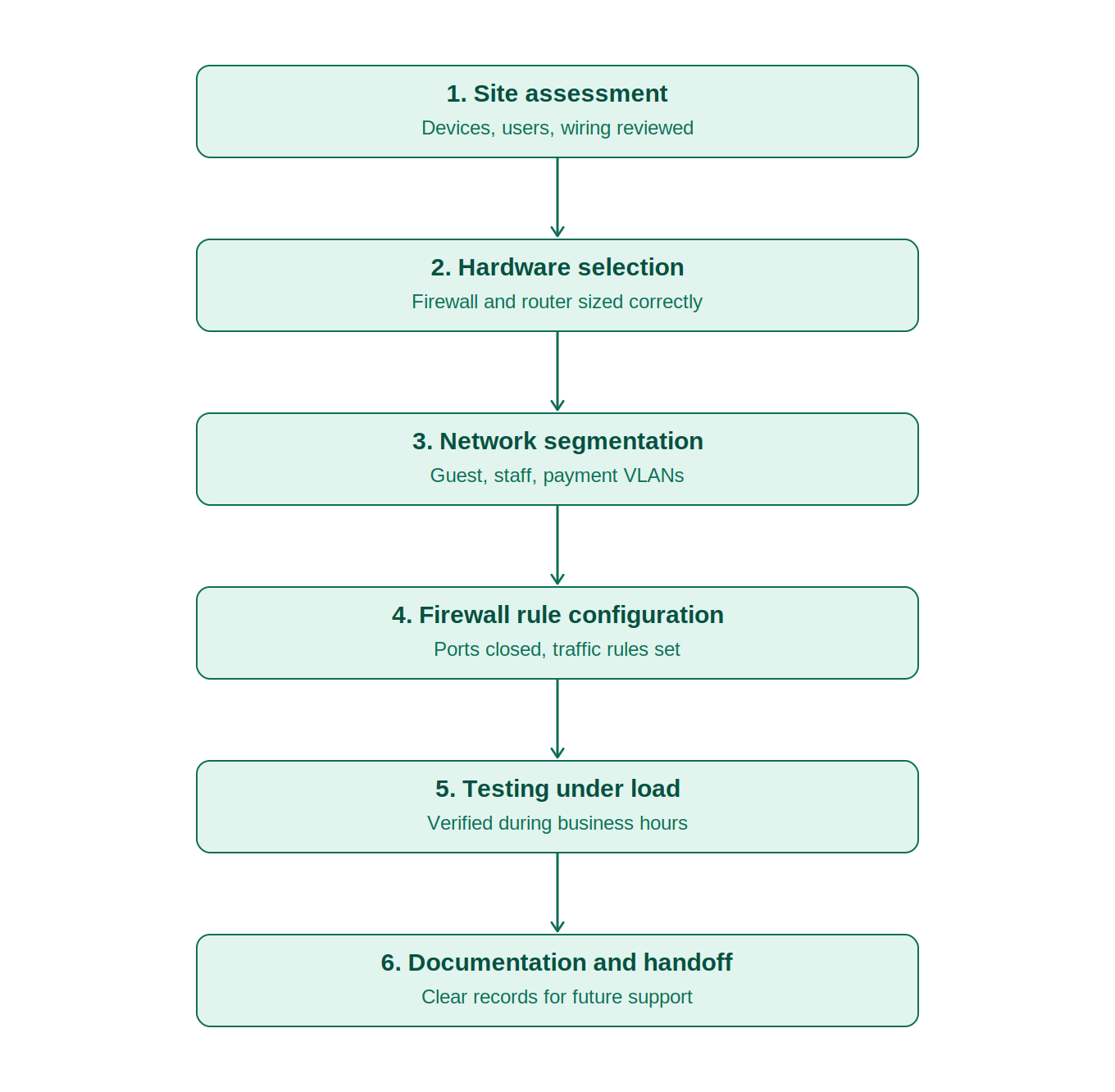
This is where a lot of “IT guys” cut corners, so it’s worth knowing what a complete job should look like. When we handle installations for clients across Los Angeles, the process generally covers:
- Site assessment — Understanding how many devices, users, and locations need to be covered, plus checking existing wiring and access points.
- Hardware selection — Choosing a firewall and router matched to actual business needs, not oversized (wasted budget) or undersized (bottlenecks within a year).
- Network segmentation — Setting up VLANs so guest traffic, staff traffic, and sensitive systems like payment terminals are properly separated.
- Firewall rule configuration — Defining exactly which traffic is allowed in and out, closing unused ports, and setting up intrusion detection where appropriate.
- Testing under real conditions — Running the network under normal business load before calling it done, not just checking that lights are green on the hardware.
- Documentation and handoff — Leaving the client with clear records of what was configured, so future troubleshooting doesn’t start from zero.
If any of these steps get skipped, the setup might work fine on day one but cause headaches six months down the line. We fold this process into our broader Network security solutions so nothing gets treated as an afterthought.
Should Every Business Have Network Segmentation, Even a Small One?
Yes — and this surprises people, because segmentation sounds like something only larger companies need. But even a five-person office benefits from separating, say, the front-desk guest Wi-Fi from the network running accounting software.
I’ve seen a coffee shop’s guest network get compromised through a customer’s infected phone, which then had a clear path to the shop’s card-processing system because everything sat on one flat network. Segmentation would have stopped that cold. It’s not an expensive add-on — it’s mostly a configuration choice made at setup time, which is exactly why getting the installation right from the start matters so much.
What Happens If I Just Keep My Current Setup and Skip the Upgrade?
Nothing, usually — until something does happen. That’s the tricky part about network security. A misconfigured firewall or an outdated router doesn’t announce itself. Businesses run for years on shaky setups without incident, and then one phishing email, one infected USB drive, or one exposed port turns into a very expensive week.
According to the Cybersecurity and Infrastructure Security Agency (CISA), keeping network devices updated and properly configured remains one of the most effective ways small organizations can reduce their exposure to common attacks. That guidance lines up with what we see on the ground: most incidents we get called in to clean up trace back to basic configuration gaps, not sophisticated attacks.
How Long Does a Firewall & Router Installation Usually Take?
For a typical small office, a full installation — including assessment, configuration, and testing — usually takes somewhere between two and five hours, depending on the number of access points and how much segmentation is needed. Larger offices with multiple floors or departments can take a full day. We always plan installations around business hours so operations aren’t disrupted, and most clients don’t even notice downtime beyond a brief window during the actual cutover.
Who Should You Call for This in Los Angeles?
Honestly, the right answer is: whoever can explain your setup back to you in plain language and show you exactly what they configured and why. If a technician can’t answer basic questions about your firewall rules or why they chose specific hardware, that’s worth pausing on.
At Geeks Worldwide Solutions, we’ve been handling network installations, router configuration, and ongoing security management for businesses across Los Angeles and beyond for over eight years. Whether you need a first-time setup, a security audit of your existing network, or ongoing Computer Support Services to keep everything running, our team walks you through the process step by step rather than leaving you guessing.
If your current setup falls into any of the warning signs mentioned above, it’s worth getting it checked before it turns into a bigger problem. Contact us for a straightforward assessment of your network, and we’ll tell you honestly what needs fixing and what’s already working fine.

One Response