A Dark Web Monitoring Alert means a monitoring service has discovered information associated with you (such as your email address, password, phone number, etc.) in data related to the dark web. This could mean your data was compromised in a data leak or shared without your consent. Getting an alert doesn’t mean someone has accessed your accounts or stolen your identity. But act like it is real, confirm the alert through a trusted service, secure the impacted accounts, and be on the lookout for any suspicious activity.
What is a dark web monitoring alert and why did you get one?
A dark web monitoring alert is a notification that a security service has found information related to your identity in exposed databases, leaked credentials or other sources it monitors. The alert gives you a heads up about a potential risk before it leads to any account misuse.
The dark web is a part of the internet that needs special software or settings to access. Some of the activity is legitimate, but criminals use it to exchange stolen credentials, personal information, and other data.
There are several reasons you might receive an alert:
- A website or online service you use had a data breach.
- Your email address was found in a database that was leaked.
- A password you’ve used was compromised.
- A data collection was sent out publicly with personal information.
- The monitoring service has identified that you have information associated with you.
The alert could be for an old breach, not a fresh one. Your data may have been compromised months or years ago and only now discovered by your monitoring service.
What Can Dark Web Monitoring Tell You?
Dark web monitoring services search specific sources for information that matches information you provide or authorize them to search for. The information detected depends on the type of service and its coverage.
Common examples of the types are:
- Email ID and username.
- Passwords or logins that have been previously exposed.
- Telephone numbers and home addresses.
- Names and other identifying information.
- Financial information or identity-related information where the service offers such monitoring.
Not all services scan the same sources, and no monitoring tool can promise to catch every exposure. An alert also does not mean that everything on the list is up-to-date or usable.
For example, a monitoring service may discover an email address and an old password in a breach dataset. This means credentials could be compromised, but it doesn’t mean someone’s logged into your email account.
What is the Next Step After a Dark Web Monitoring Alert?
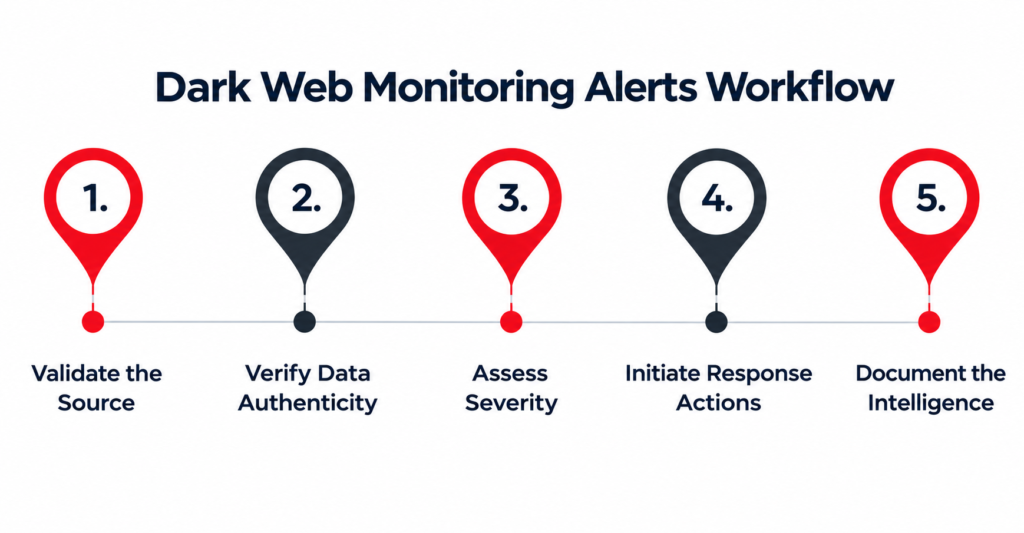
The best thing to do is to lock down the accounts that are tied to the exposed data, beginning with the most sensitive. Act fast but avoid panicking or following instructions in an unexpected message without checking who it is from.
1. How do you verify the alert? Is it real?
Instead of clicking links in a surprise email or text, open the monitoring service via its official website or app. Verify the reported information, the service that was affected, and any breach date or other information provided.
If the alert tells you to pay immediately, or to give a verification code or your current password, treat it as suspicious. If you cannot verify the warning, contact the service using a verified support channel.
2. How to change an exposed password?
Change the password that was leaked on the impacted website or app. If you have used the same password on any other accounts, change it there too, especially your email, banking and other important accounts.
Make sure each account has a strong, unique password. A good password manager will generate and store unique passwords for you, decreasing the chances of a single breach compromising multiple services.
3. How Do I Protect My Most Important Accounts?
First, protect your primary email account, which is often used to reset passwords for other services. Review recent sign-ins, active sessions, recovery info and connected apps. Sign out suspicious sessions and remove unauthorized access.
Enable multifactor authentication (MFA) and use an authenticator app or a passkey if one is available to you. This adds another layer of security in case a password is compromised.
4. How to identify signs of identity theft?
Review your bank and credit card transactions, activity in your accounts, password reset messages and security alerts. If you notice an unauthorized transaction, call your financial institution straight away on the official number or app.
If sensitive identity information was exposed, consider the identity protection options available in your country. In the U.S., you can get help with reporting and recovering from identity theft from the Federal Trade Commission.
Can a Dark Web Monitoring Alert Be a False Positive?
Yes, an alert can be old, not complete, or matched incorrectly to your info. Some services will find old breach records and a match does not mean your current account is compromised.
See what information was leaked and whether it’s yours. If the alert lists an old password you no longer use, the immediate risk may be lower, but check for password reuse and suspicious account activity.
Don’t dismiss an alert simply because the information is old. Even reused passwords and personal details can be used by criminals to create convincing phishing messages or try to recover accounts.
How to Avoid Future Dark Web Exposure
You can’t control what other companies do with your information, but you can reduce the chances of someone misusing your account by consistently following security practices.
- Have a unique password for every account.
- Turn on MFA or passkeys if available.
- Update your computer, browser, phone, and security software.
- Don’t open strange links or attachments.
- Reduce the amount of personal information you share in public.
- Monitor security alerts and significant financial accounts.
- Use a reputable password manager to keep your credentials in order.
Dark web monitoring can provide an additional alert, but it cannot remove leaked information from all sources or prevent all attacks. Good online habits and robust account security still matter.
When Should You Contact a Cybersecurity Expert?
If you’ve had multiple accounts compromised, your business credentials compromised, or you’ve seen suspicious access to company systems, you should consider professional help. A cybersecurity professional can assist with investigating the incident, securing devices and accounts, reviewing access permissions, and recommending steps to reduce further risk.
For businesses, the response may include checking employee accounts, resetting compromised credentials, reviewing security logs and following the organization’s incident response process. Don’t assume that a password reset closes an incident – if sensitive customer information may have been exposed, consult with appropriate legal and regulatory guidance.
How Can Geeks Worldwide Solutions Help You to Protect Yourself?
A Dark Web Monitoring Alert can be a warning that your personal or business information needs action. Checking the alert, changing exposed passwords, enabling MFA, and looking for suspicious activity can help reduce the risk of further damage.
Know more about cybersecurity, account protection, computer security, and safer technology practices from your trusted partner Geeks Worldwide Solutions. Stay aware, have good security practices, and seek professional help when an incident needs a deeper look.